
Grok Imagine Image V2 vs Seedream V5 Pro is a practical comparison for teams producing GPU, data-center, and edge-AI visuals. Both models were run at 2K with the same five prompts and aspect ratios. This is not a synthetic benchmark: the conclusions come from the outputs generated for this review, then checked against each vendor’s published capabilities.
Grok Imagine Image V2 test setup
The test set used five infrastructure-focused briefs: a liquid-cooled GPU rack, a typography-heavy inference cover, a cooling cutaway, an edge-computing city, and a dense network-operations-center dashboard. Each brief asks for a different failure mode. People and reflective surfaces test scene coherence. Type tests layout planning. A cutaway tests whether visual plausibility drifts into fake engineering. The NOC prompt tests the point at which generated detail stops being usable information.
Grok Imagine Image V2 was run at medium quality, 2K, with one output per prompt. Its Wiro model page exposes 1K and 2K resolution choices plus 13 selectable aspect ratios, including 16:9, 3:4, and 21:9. Seedream V5 Pro was run as a 2K PNG with watermark disabled. At 2K, its documented 16:9 output is 2,816 by 1,584 pixels; its 21:9 option is 3,136 by 1,344 pixels. Those dimensions matter when an image will be cropped into a blog hero, slide, or dashboard backdrop.
The models are not interchangeable. xAI says Imagine Image 2.0 focuses on instruction following, typography planning, editing, and multi-reference work. ByteDance positions Seedream 5.0 Pro around image-text alignment, structural coherence, text rendering, information visualization, and regional editing. That positioning gives a useful hypothesis. The five tests check whether it appears in infrastructure-oriented work, rather than treating vendor claims as a result.
What the five tests showed
Test 1: Liquid-cooled GPU rack
Prompt: Night shift inside a liquid-cooled AI data center, three technicians in reflective vests inspect a glowing GPU rack, blue fiber optics, documentary photography, crisp readable rack labels, 16:9.
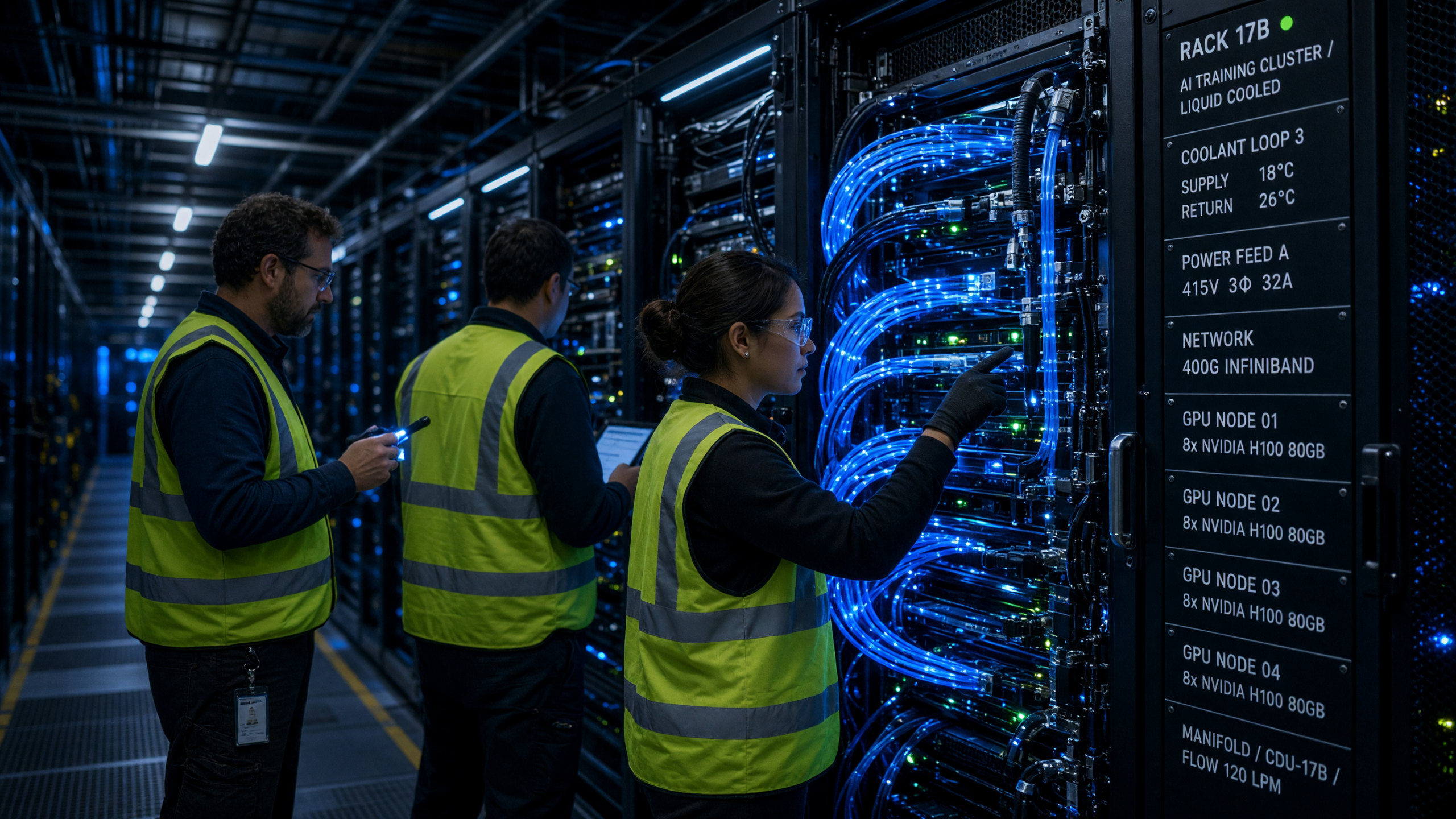

Both outputs establish the setting quickly. Grok gives the scene a stronger documentary read: people have a reason to be in frame, and the lighting directs attention toward the rack. Seedream produces denser material texture and a more polished product-image finish. Neither model makes tiny rack labels reliable enough for a production asset. That distinction matters because a label that looks almost correct is worse than decorative blur when it names a rack, coolant loop, or alert state.
Test 2: Inference typography
The same 3:4 editorial brief requested a clear headline, a small subhead, and space for a later logo lockup. Grok made the main hierarchy readable, though small print still varied. Seedream made a cleaner layout-oriented image with more predictable negative space. That matches ByteDance’s emphasis on dense information layout, but it should not be read as permission to ship generated copy unchanged.
For a developer-relations image, the safe workflow is simple: generate the visual direction, export it, then typeset the benchmark name, version, dates, and claims in a design tool. Keep a text-free safe area of at least 15 percent of the frame when possible. That gives a designer room to place copy without covering the part of the image that carries the story.
Test 3: GPU cooling cutaway
The cutaway prompt asked for cold plates, pumps, manifolds, supply lines, and a heat-exchanger loop. Both models produced persuasive shapes. Neither supplied a dependable schematic. The images can help a technical writer explain why direct-to-chip cooling changes rack design, but they cannot validate flow direction, fitting type, pressure drop, or service clearances.
This is the developer and infrastructure takeaway: use generated cutaways for narrative context, not for operational documentation. A published architecture diagram needs source-controlled vectors, named components, a revision date, and review by the people who own the design. The generated image belongs beside that diagram, not in place of it.
Test 4: Edge-AI city
The vertical rainy-street brief asked for an edge inference story: cameras, a roadside cabinet, fiber backhaul, and a nearby retail environment. Grok delivered the more cinematic image. Seedream left a cleaner composition with more room for a campaign headline. Both can support a pitch deck or a landing-page concept, but neither should imply an installed topology. An edge deployment has real constraints: backhaul availability, power budget, thermal envelope, remote access, and hardware replacement time.
Test 5: Dense NOC dashboard
The 21:9 stress test was the dividing line. Both models made convincing operations rooms, but neither maintained trustworthy fine chart labels, timestamps, or values. That result is useful. A fake dashboard can work as background art in a keynote. It should never appear in a runbook, incident review, capacity report, or product UI where a reader might assume the numbers are live.
What changes in production
The main choice is not simply cinematic versus clean. It is about where the asset enters the delivery pipeline. Use Grok Imagine Image V2 when the brief needs a human moment, a sense of scale, or an editorial image that can carry a story before copy lands. Use Seedream when the creative team needs a more deliberate composition, information-dense visual direction, or room to finish an infographic manually.
Resolution changes the infrastructure cost of the next step too. A 2K image is suitable for a web hero or a slide, but it is not automatically a print master. Teams should generate only the sizes they need, store the original prompt and output URL with the creative ticket, and convert or compress derivatives at the edge. This reduces repeated generation, makes approvals auditable, and avoids sending oversized source files through every content path.
Keep generated images out of automated monitoring and documentation pipelines. A practical guardrail is to label them as illustrative at asset-ingest time, then block that label from the documentation build. Another is to require human approval before an image enters any customer-facing page. These small controls prevent visual experimentation from becoming an accidental source of false operational data.
For repeatable comparisons, lock three things: prompt text, aspect ratio, and output resolution. Change one variable at a time. A 3:4 result and a 21:9 result are not evidence of a model-quality difference by themselves; framing changes the composition problem. Record the model version and quality mode as well. That is enough provenance to revisit a creative decision months later without pretending the test is a standardized benchmark.
Grok Imagine Image V2 practical checklist
- Use 2K and a wide ratio for web heroes, then preserve a safe area for final typography.
- Use generated dashboards only as atmosphere. Render metrics from real telemetry.
- Pair cooling or network imagery with a reviewed vector diagram when technical accuracy matters.
- Archive the exact prompt, aspect ratio, resolution, and model version with the asset.
- Run the same prompt through both models before committing a campaign direction.
Verdict
Choose Grok Imagine Image V2 when mood, narrative, and photorealistic infrastructure scenes lead the brief. Choose Seedream V5 Pro when the brief depends on composition, information density, and prominent text areas. Both work best upstream of the final design pass. The production asset still needs verified data, deliberate typography, and a review path that separates illustration from engineering fact.
Run and scale both models on Wiro once the visual direction is proven.