
Liquid cooling for AI data centers has moved from a facilities upgrade to a constraint on GPU cluster design. A modern NVIDIA DGX GB rack can draw about 120 kW, according to the NVIDIA DGX GB Rack Scale Systems User Guide. At that density, fans alone cannot carry the whole thermal job without consuming large amounts of space and power. Cooling, electrical distribution, networking, service access, and inference latency now meet at the rack.
Liquid cooling for AI data centers starts at the rack
Average building load hides the problem. GPU infrastructure fails its thermal assumptions one rack, one loop, or one maintenance window at a time. A 120 kW rack converts almost all of its input power into heat. That is roughly the heat output of 120 one-kilowatt space heaters packed into a single cabinet. The cooling path has to remove that heat continuously, not just during a short benchmark.
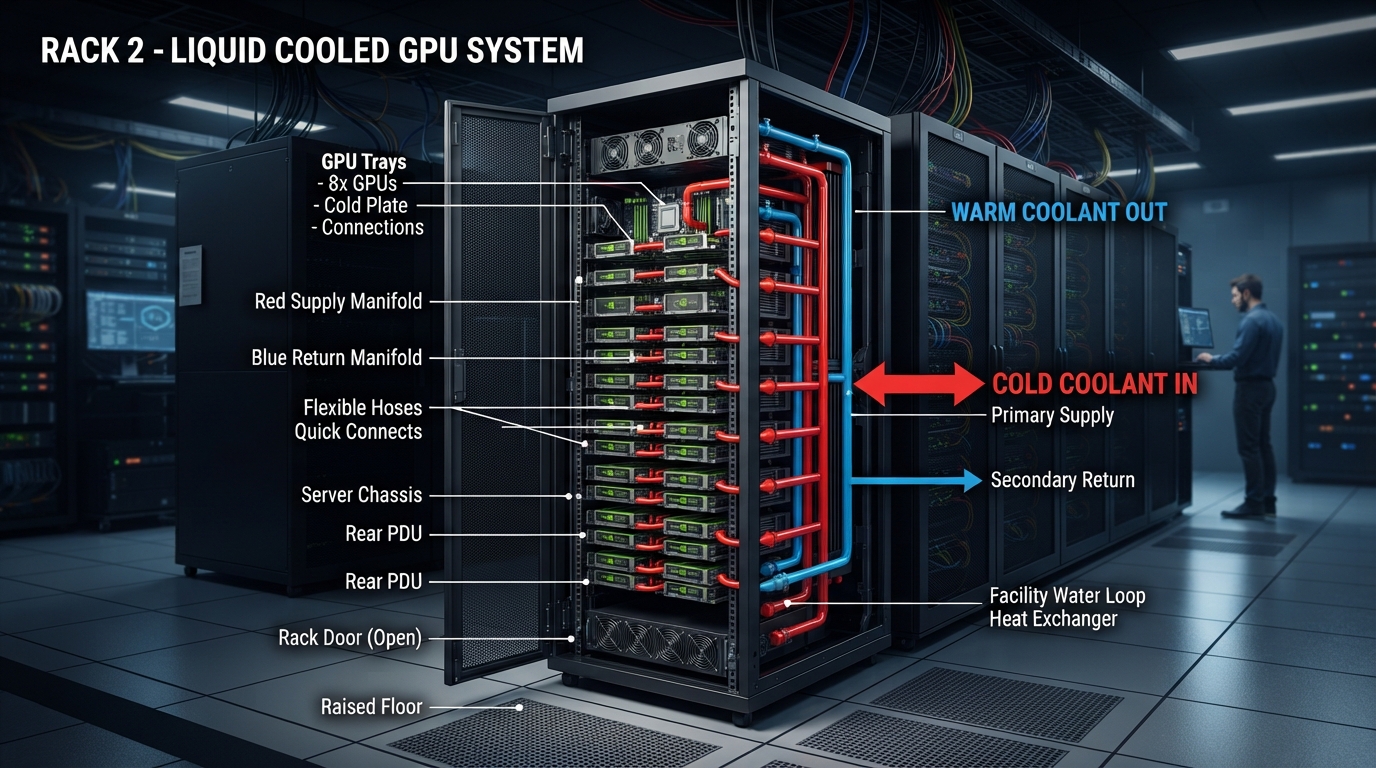
NVIDIA describes an NVL72 rack as 18 one-rack-unit compute trays with four Blackwell GPUs per tray, plus nine NVLink switch trays. That creates a 72-GPU domain with a shared physical cooling and power envelope. The guide also places liquid manifolds at the rear of the rack. This is why a GPU cluster cannot be planned as servers first and plumbing later.
For infrastructure teams, the rack boundary sets the useful design questions: What is the maximum IT load? What heat load reaches the coolant? How much remains in the air path? Which components share a manifold? How much capacity remains after one pump, CDU, or facility-water path is unavailable? Answers need to exist before racks arrive on the loading dock.
What a direct-to-chip loop does
Direct-to-chip cooling sends liquid through cold plates attached to high-power components, then returns the warmed liquid through rack manifolds to a coolant distribution unit, or CDU. The CDU separates the equipment loop from the facility loop through a heat exchanger. Pumps maintain flow on the equipment side; the building removes heat on the other side.
This does not make air cooling disappear. In the DGX GB rack design, NVIDIA says the CPUs and GPUs use liquid-cooled cold plates, while components such as networking and storage remain air cooled. That split matters. A design that sizes only the liquid loop can still leave top-of-rack switches, power supplies, and service aisles with an inadequate air path.
Warm-water operation can improve the heat-rejection side of the system. ASHRAE’s AI data-center framework points to direct-to-chip and warm-water loops as sources of higher-grade heat because they operate with higher supply and return temperatures. The practical benefit is not a magic PUE number. It is more opportunity to use economization, reduce mechanical refrigeration hours, or make heat reuse technically plausible. Site climate, water chemistry, and local regulations still decide whether those options pay off.
Five numbers to model before deployment
| Metric | Why it matters | Practical use |
|---|---|---|
| Rack IT load (kW) | Sets the heat load that must leave the rack. | Model sustained inference, not nameplate GPU TDP alone. |
| Coolant supply and return temperature | Shows how much temperature lift the loop achieves. | Trend the delta alongside rack power and flow. |
| Flow rate and pressure drop | Low flow or rising restriction reduces cold-plate performance. | Set alerts for drift, not only absolute limits. |
| CDU capacity and redundancy | Defines the available thermal headroom during maintenance. | Test N+1 assumptions with the largest failure domain. |
| GPU clocks, power, and latency | Connects thermal behavior to application behavior. | Correlate throttling with p95 and p99 inference latency. |
The useful equation is simple: heat removed rises with coolant mass flow, its specific heat, and the temperature increase across the loop. Engineers do not need to calculate this by hand in production, but they should understand the implication. If rack power climbs while flow stays flat, the return temperature must rise, or component temperatures will rise. Telemetry makes that relationship visible before a workload starts throttling.
Use a rack-level capacity model that separates three cases: expected load, sustained peak load, and degraded operation. Expected load supports normal scheduling. Sustained peak load covers long training runs, batch jobs, or traffic spikes. Degraded operation asks whether the cluster remains inside safe limits when a pump, CDU module, or facility loop is out of service. The third case is the one that turns a minor maintenance event into a capacity incident.
Cooling reliability is an application reliability concern
Leak detection, isolation valves, dripless connectors, and service procedures are not optional details. NVIDIA specifically calls out leak detection as a reliability and uptime safeguard in DGX GB rack systems. A liquid loop brings more heat capacity close to the chips, but it adds hoses, quick connects, manifolds, seals, pumps, and sensors that need an operating model.
Start with ownership. Facilities teams usually own heat rejection and water treatment. Platform teams own cluster availability and scheduling. Hardware teams may own rack service. Those boundaries create gaps unless everyone sees the same signals. A GPU scheduler should know when a rack has reduced cooling headroom. A facilities dashboard should show whether a power increase came from a new model deployment, a batch window, or a failed workload placement rule.
Commissioning should include failure drills. Validate leak alarms, confirm the rack can be isolated, and measure how quickly telemetry reaches the team that can drain jobs. Test a controlled load ramp and compare GPU temperature, clock behavior, supply temperature, return temperature, flow, and application latency. A successful test produces an operating envelope, not just a green light.
What developers and ML platform teams should ask for
Developers do not need to design pipework, but they do need thermal facts when setting service-level objectives. A model endpoint can look healthy at 30% utilization, then miss p99 latency once a cluster runs hot and clocks reduce. Ask the platform team for rack placement policy, the maximum supported sustained power per rack, and the signals that trigger job migration or admission control.
For inference, separate throughput experiments from latency experiments. A batch run may tolerate a short clock change. An interactive agent service may not. Record tokens per second, queue depth, p50, p95, and p99 latency with GPU power and temperature. That creates a defensible explanation when performance moves: model behavior, network contention, scheduler placement, or thermal headroom.
For training, plan around long-duration load. The heat profile from a 20-minute benchmark says little about a multi-day job. Reserve headroom for checkpoint storms, network-intensive phases, and partial failures. Keep a clear rule for whether jobs migrate, pause, or continue at reduced speed when cooling capacity falls. This is capacity engineering, not a facilities footnote.
Practical takeaways
- Plan liquid cooling at rack granularity, with power, heat, network, and service constraints in one model.
- Measure liquid and air paths separately. Direct-to-chip cooling still leaves air-cooled components.
- Link coolant telemetry to GPU clocks and tail latency. Temperature alone does not show user impact.
- Design and test degraded cooling operation before production traffic depends on it.
- Give developers clear workload-placement and load-shedding rules tied to thermal headroom.
Liquid cooling for AI data centers protects usable compute when accelerator density rises. Build the rack, cooling loop, and model-serving policy as one system, then make the thermal signals visible to the teams responsible for performance. Run and scale AI models on Wiro.